01What a branch actually is
In Steam's plumbing, a branch (the older word is beta; Valve uses both) is a named pointer to a particular build of an app — that is, to a specific set of depot manifests. The default branch is called public: it's the live version everyone gets unless they choose otherwise. Developers create additional branches for all the reasons software needs parallel versions — an experimental branch for testing, a staging branch for QA, and, the one this audience cares about, branches that park an old version in place so players can drop back to it: legacy_1.6, version-1.5, default_old, 1.4.3-legacy, and so on.
That last category is why branches matter so much for downgrading. When a developer keeps a public branch around for an old patch, you don't need SteamDB archaeology — the old build has a name, and you can ask for it by name. SteamDB puts it plainly: branches other than public "are often used for storing an older version of the game for people to downgrade to, or for testing new patches/content." Whole guides on this site lean on exactly this — Project Zomboid, RimWorld and Subnautica all hand you the old version as a labelled branch.
02The two flags
DepotDownloader exposes branches through two flags:
| Flag | What it does |
|---|---|
-branch <name> | Download from the named branch instead of public. Default is public, so leaving it off and passing -branch public are identical. |
-branchpassword <pass> | Supply the access code for a password-protected branch (section 04). Only valid alongside -branch. |
Pulling a named public branch is as simple as it sounds:
> .\DepotDownloader.exe -app 264710 -branch legacy \
-username you -remember-password -dir .\subnautica-legacyThe flags used to be -beta and -betapassword, and a lot of tutorials still show them. They still work — current 3.x keeps -beta/-betapassword as living synonyms for -branch/-branchpassword (internally the config field is even still called BetaPassword). Use whichever your muscle memory prefers; if you pass both, the -branch form wins. The CLI reference lists them together.
03Pointer vs pin — the distinction that matters
This is the part worth slowing down for, because it decides whether your download is reproducible next month.
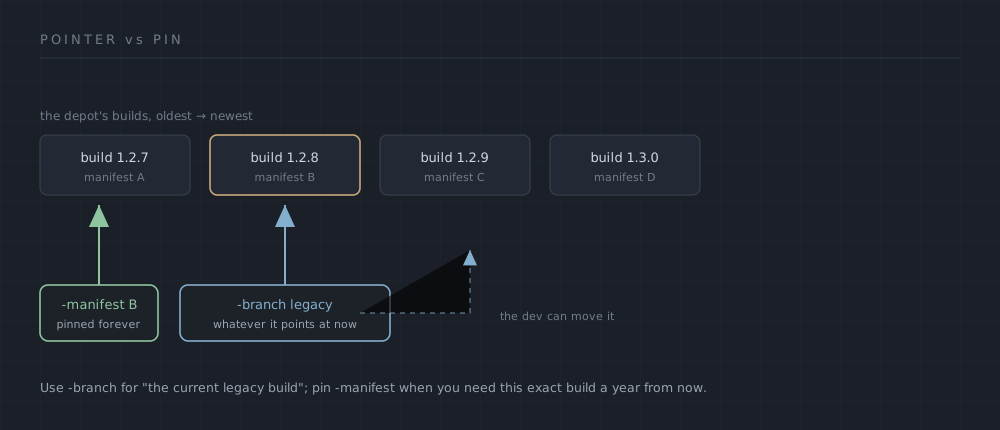
-branch gives you whatever the branch aims at today — the developer can move it. -manifest locks one exact build that never changes. Original diagram, drawn for this page.-branch resolves to wherever the branch points right now. When you ask for -branch legacy_1.6, DepotDownloader looks up that branch's current manifest and downloads it. That's convenient — no manifest ID to find — but it means you're trusting the branch to keep pointing where it does today. A developer can move a branch to a newer build, rename it, or delete it entirely, and your "same command" will then fetch something different or fail.
-manifest pins an exact build and ignores branches completely. If you pass a manifest ID, DepotDownloader skips the whole branch-resolution step and fetches precisely that historical build — immune to the developer moving or deleting any branch. The two even compose: use -branch to discover the manifest a branch currently serves (run with -manifest-only to dump it), then record that manifest ID and pin it forever.
-branch <name> | -manifest <id> | |
|---|---|---|
| Resolves to | the branch's current build | one exact build |
| Needs an ID? | no — just the name | yes — from SteamDB |
| Survives the dev moving things? | no | yes |
| Best for | "give me the current legacy build" | "give me this build, reproducibly" |
Rule of thumb: a branch is the friendly front door for "the developer's blessed old version," and a manifest is the archival lock for "the exact build I tested against." For a one-off downgrade, the branch name is usually all you need; for anything you want to reproduce later — a server you'll rebuild, a modding baseline, a preservation copy — note the manifest ID and pin it. (Remember a manifest ID is not a build ID; the find-your-IDs page untangles those.)
04Password-protected and private branches
Some branches are gated. A developer can attach a password to a branch — historically to hand QA or backers access to a build the public shouldn't see. DepotDownloader handles these with -branchpassword:
> .\DepotDownloader.exe -app xxxxxx -branch privatebeta -branchpassword thecode -username youTwo honest points about what the password does and doesn't do:
- It is not a substitute for owning the game. You still need a license on the account you log in with. The password only unlocks the branch's manifest list — Steam won't even show you the branch's contents without it. Ownership and branch access are two separate locks; you need both.
- It's per-run, not stored. Unlike your login token, the branch password isn't cached to disk — you pass it each time. Pass
-branchpasswordwithout a-branchand the tool refuses outright ("Cannot specify -branchpassword when -branch is not specified").
Valve reworked password-protected branches into fully private ones that are invisible in the public app metadata — SteamDB now can't see them at all, and neither can third-party tooling that relies on that metadata. The practical effect: a brand-new private branch may not be discoverable or resolvable the way older password branches were. Old-style password branches that predate the change generally still behave as above; genuinely private modern ones are, by design, not something an external tool can enumerate.
05Finding what branches exist
DepotDownloader has no "list the branches" command — it downloads a branch you name, but it won't enumerate them for you. So you find the name elsewhere first:
- SteamDB. An app's page lists its public branches (under the depots/betas info), with the build each currently points to. This is the fastest way to see whether an old version is parked as a named branch — but it only shows public branches, not gated ones.
- The Steam client. Properties → Betas (newer UI: "Game Versions & Betas") shows the branches your account can currently select, including any you've unlocked with a code. Read the name there, then feed it to
-branch— verbatim.
Why pull a branch with DepotDownloader at all, when the Steam client has that dropdown? Because the client switches your installed copy in place and auto-updates it — picking a beta replaces what you have, and going back means another full download. DepotDownloader drops the branch into an isolated -dir folder without touching your live install, so you can hold several versions side by side. That's the same isolation argument the downgrade guide is built on.
06Gotchas worth knowing
- The silent fallback to public. The most confusing one: if you misspell a branch name (or it no longer exists), DepotDownloader doesn't stop — it warns
Depot … does not have branch named "…". Trying public branch.and downloads public instead. If you "downgraded" and got the current version, check your scrollback for that warning before blaming anything else — and cross-check the it-launched-the-current-version page. - Branch names are case-exact. Only
publicitself is matched case-insensitively. For any custom branch, match the name exactly as SteamDB or the Steam client shows it —legacy_1.6is notLegacy_1.6. publicand no flag are the same thing. There's no difference between omitting-branchand writing-branch public; both resolve to the default.- A branch can still be gated by the request-code system. Asking for an old branch's current manifest is usually fine, but if a branch points at an old manifest Valve has restricted, you can still hit the "no manifest request code" wall — branch access and manifest authorization are different gates.
Net of it: branches are the easy, human-readable door to a developer's supported old versions, reached with -branch and (when gated) -branchpassword; manifests are the durable lock for an exact build, reached with -manifest. Most downgrades start at the door. If you want the download to still mean the same thing a year from now, write down the manifest behind it. The glossary keeps the one-line definitions, and the CLI reference has every flag these examples used.