Download
depot / how-it-works

Steam is a warehouse.
This is your forklift.

Before the first download, it helps to know how Valve actually stores games. Four terms — app, depot, manifest, chunk — explain everything DepotDownloader does, and once they clicked for me the whole tool stopped feeling like magic.

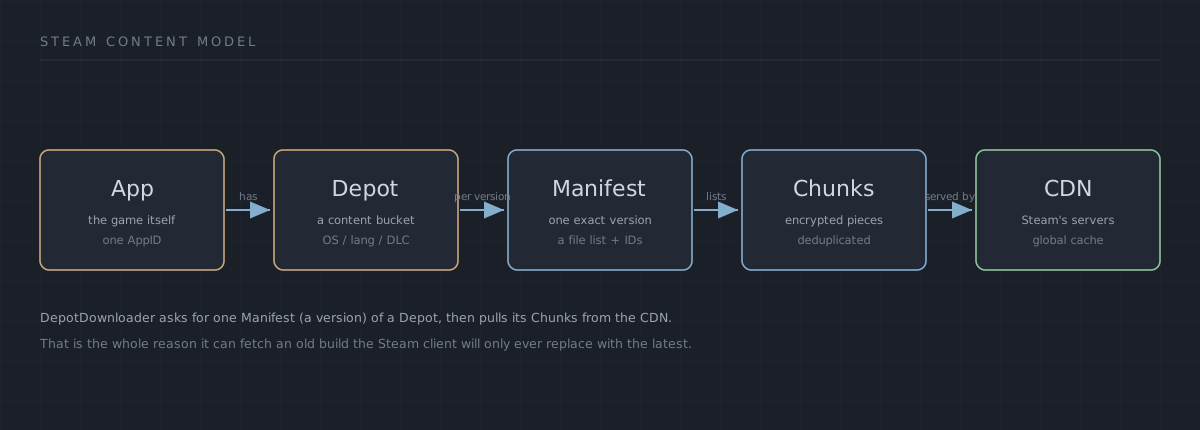
Steam content model: an App holds Depots; each Depot has one Manifest per version; a Manifest lists encrypted Chunks; Chunks are served from Steam's CDN.
The whole model in one picture. This is the mental map I wish I'd had on day one — an app holds depots, a depot carries one manifest per version, a manifest lists encrypted chunks, and the chunks come down from Steam's CDN. Original diagram, drawn for this page.
01 / the warehouse

The anatomy of a game

Every Steam game ships as depots — sealed containers of files. Each time developers push an update, Steam writes a new manifest: a numbered packing list describing exactly which file chunks belong to that build.

The Steam client only ever hands you the latest manifest. DepotDownloader talks to the content servers directly, so you can request any manifest ID that ever existed — and rebuild the game exactly as it was on that day. The part that took me longest to trust is that the old manifests never disappear; on my last check, June 2026, builds from a decade back were still served straight off the CDN.

app
A product on Steam — game, tool or server. Identified by AppID (e.g. 440 = Team Fortress 2).
depot
A logical group of files inside an app: content, binaries per OS, language packs.
manifest
A snapshot of a depot at one moment in time. The key to time travel — find IDs on SteamDB.
chunk
A ~1 MB compressed, encrypted block of file data served by the Steam CDN.
APP 440 TEAM FORTRESS 2 DEPOT 441 content DEPOT 442 win binaries DEPOT 232251 linux server MANIFEST HISTORY 7617088375292… · 2024 4884950798805… · 2019 1118032470228… · 2013 ◄ …every build ever shipped CHUNKS · STEAM CDN YOUR DISK
02 / shipping route

Four stops from CDN to your disk

01

Connect

Logs into the Steam3 network over SteamKit2 — with your account, a QR code, or fully anonymous for free content.

Connecting to Steam3... Done!
02

Resolve

Fetches app info, picks the branch, requests the manifest and the manifest request code Steam now demands.

Got AppInfo for 440
03

Decrypt

Obtains the depot key for your licenses and unseals each chunk as it streams off the content servers.

Got depot key for 441
04

Assemble

Reassembles chunks into files, verifies checksums, and can re-validate any existing install on demand.

Depot 441 - Downloaded ✓

Want the layer below this picture? The manifests & request codes deep dive takes the resolve step apart bolt by bolt, and the glossary defines every term on this page in a few lines each.

Why the model matters in practice

This isn't trivia — every capability that makes DepotDownloader useful falls straight out of those four terms, and once they clicked for me the rest of this site stopped needing memorising:

Because……you can
a manifest is a permanent record of one exact buildinstall a years-old version the client would only ever replace — the whole downgrade workflow.
content is split into separate depotspull just the Linux server, or the soundtrack depot, or a different language — without the rest of the game.
a manifest lists every file as deduplicated chunksre-run a download and only the changed chunks come down; and pull a single file out of a 60 GB depot with a filelist.
some content is licensed to the app anonymouslydownload free dedicated servers and demos with no account at all.

The one thing the model also explains is the limit: a manifest still has to pass Steam's licence check, and since 2025 Valve gates request codes for many old manifests. That's not the tool failing — it's the same content system, doing what it's told. When you hit it, the request-code page is where the picture above turns into a fix, and the live old-versions status tracks what's still reachable.